Design Products Users Understand & Enjoy
We design clean, intuitive, and conversion-focused interfaces for websites, mobile apps, SaaS platforms, dashboards, and business software.
Best Fit For UI/UX Design
- check_circleStartups designing a new MVP
- check_circleBusinesses redesigning an old website or platform
- check_circleSaaS companies improving product usability
- check_circleMobile app teams preparing for development
- check_circleCompanies with complex dashboards or admin panels
- check_circleTeams with low conversion, poor flow, or confusing UX
- check_circleFounders who need a clickable prototype before development
From Design Friction To Product Confidence
Users feel confused about where to go, what to do, or how to complete key actions.
Users can navigate smoothly and complete actions with less friction.
The interface looks outdated, inconsistent, or less professional than competitors.
The product feels clean, modern, premium, and market-ready.
Visitors or users drop off because the experience is unclear or not persuasive enough.
Clear layouts, stronger CTAs, and better flows help users take action.
Important data, actions, and navigation are difficult to understand.
Complex information becomes easier to scan, understand, and act on.
Screens, components, states, and UI rules are inconsistent or unclear for development.
Developers get organized screens, reusable components, and clear handoff guidance.


How We Design Better Experiences


Review requirements and user needs

Map user journeys and key flows
Plan information architecture
Create wireframes and screen layouts

Design web, mobile, and dashboard interfaces
Build a consistent design system
Create interactive prototypes for review

Prepare developer handoff and design guidance
How We Define The Right Product
Research & Requirements Review
Understand user needs, business goals, product requirements, and key usability challenges.
User Flows & Information Structure
Map user journeys, plan information architecture, and define clear navigation paths.
Interface Design & Design System
Create wireframes, web/mobile/dashboard UI screens, and a consistent design system.
Prototype & Developer Handoff
Build interactive prototypes, review designs, and prepare clear handoff guidance for developers.
IELTS EduLytics
Challenge
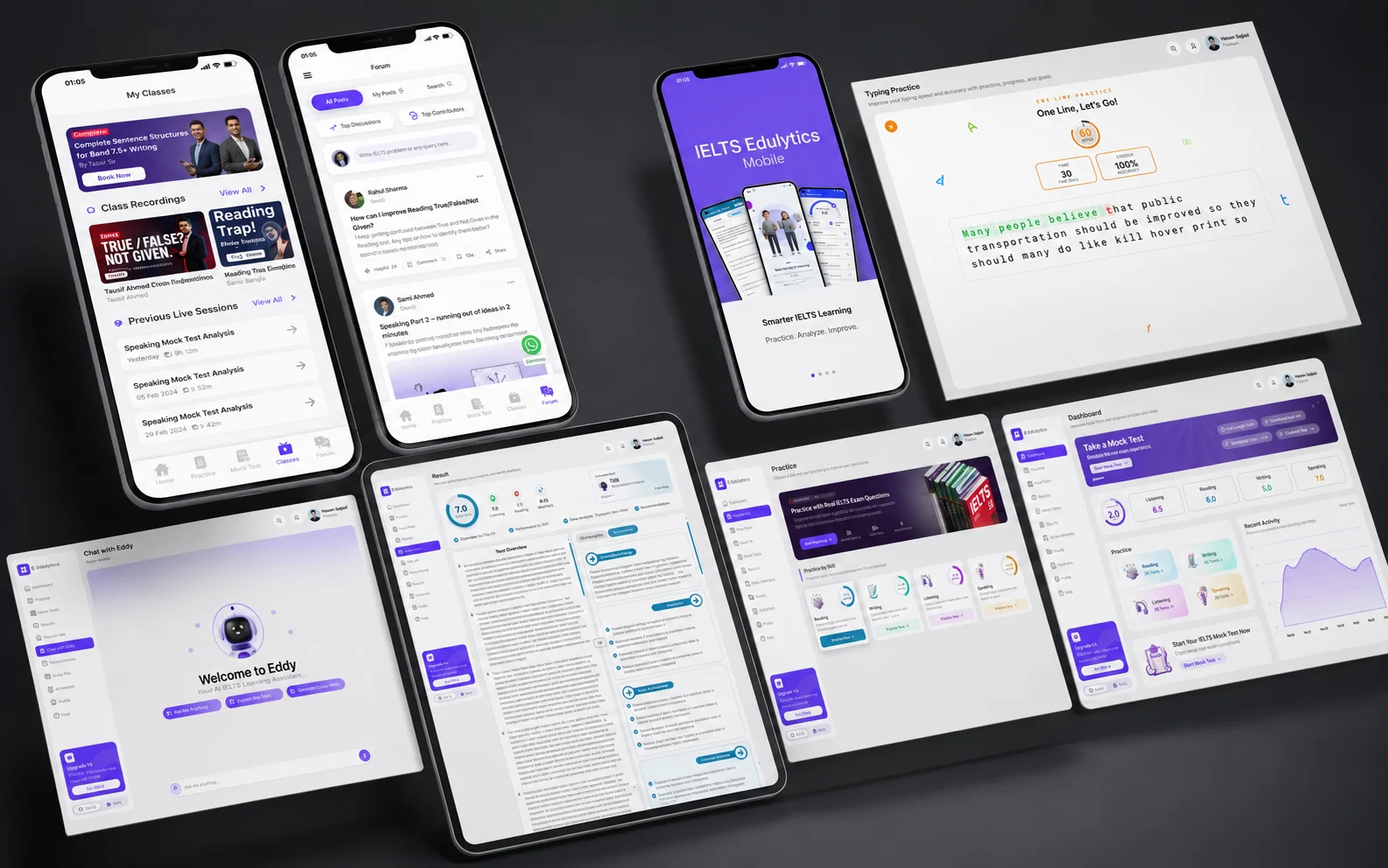
IELTS learners needed a simple way to access mock tests, practice materials, AI band predictions, speaking support, and progress insights without feeling overwhelmed.
Background
We designed a clean learning flow, dashboard structure, practice cards, mock test sections, progress visuals, and mobile-friendly user experience.
Result
A more organized EdTech experience where learners can easily understand what to practice, track progress, and move toward better band scores.
IELTS EduLytics
Challenge
IELTS learners needed a simple way to access mock tests, practice materials, AI band predictions, speaking support, and progress insights without feeling overwhelmed.
Background
We designed a clean learning flow, dashboard structure, practice cards, mock test sections, progress visuals, and mobile-friendly user experience.
Result
A more organized EdTech experience where learners can easily understand what to practice, track progress, and move toward better band scores.
The Technology Behind Our Delivery
ADOBE XD

CLAUDE
FIGMA
PHOTOSHOP

SKETCH

SPLINE
STITCH
The Answers Most Clients Ask.
Your Vision Built With Precision
Ready To Design A Better Product Experience?
Let’s create a clean, modern, and user-friendly design that helps your users understand, trust, and enjoy your product.
Start a Project